
tv lift cabinet measurement
-
How Much TV is Too Much for a Room?
Believe it or not, it is
possible to buy a TV that’s just too large for a space. While some may believe
that bigger is always better, most people understand that there are limits.
There is a direct
correlation between your screen size and how far away your seating is located.
Some entertainment experts say that a viewing angle of 40 degrees creates the
best viewing experience. An easy way to determine the screen size is to
multiply the seating distance by .84 to get the recommended screen size.So, if you sit around 8 feet
from your TV, your screen size would be around 80 inches diagonal for that
distance. That translates to approximately a 50-inch TV. An online consumer
site, CNET,
recommended no closer than 1.5 times the screen diagonal (or .667 times your
seating distance), which allows for a larger screen.In addition to distance from
the screen, the experts also looked at resolution and how much space the TV
takes up in the room. If you’re sitting too close to a large TV, you mayPosted on: May 28, 2019Posted by: Kerry Mann -
How to Measure for a TV Lift Cabinet
Bigger is not always better when it comes to home electronics. In many cases, the biggest TV that will fit in a space will absolutely dominate the room and impede decoration and even the ability to move around in the remainder of the space. With that in mind, it is possible to fit a 65” to 75” wide TV in a TV lift cabinet with no difficulty. Be aware that many TV measurements advertise the diagonal measurement of the screen rather than the full dimensions of the unit. These full dimensions are what are most important when measuring for a TV lift or full TV lift cabinet. In many cases, consolidating electronics into a self-contained, versatile cabinet can increase the amount of available space in a room.
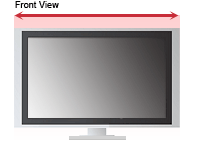
When measuring your television, first, place the top of the tape in upper left corner of the case (not just the screen), and extend to the lower left corner. Make sure to include the speakers or any other pieces attached to the case. Record this measurement as the height.
Second, take thePosted on: November 29, 2013Posted by: Kerry Mann